Mr Lim gets your message on Monday. On Wednesday he gets it again, from your colleague, because he was also on the list from last year’s event. On Friday he gets it a third time, because his number was in a third spreadsheet written as 6012 instead of 012. He doesn’t reply. He taps Block.
Nobody meant to annoy him. The list did. A clean WhatsApp contact list is the least exciting part of outreach and one of the most important: it decides how many people you reach, how many reply, and how many block you.
Why a messy list costs you
- Repeat messages get reported. Getting the same pitch twice is one of the fastest ways to irritate someone. Blocks and reports are exactly what gets a number restricted.
- You look careless. A customer who gets two messages from two people at your company assumes nobody is talking to each other.
- Your numbers lie. Duplicates and dead numbers make your reply rate look worse than it is, so you end up changing a message that was actually fine.
- People who said no get messaged again. That’s the one mistake that’s never forgiven.
One number, written five ways
The most common cause of double messages is the same phone number written differently in different files. To a spreadsheet, these are five different people:
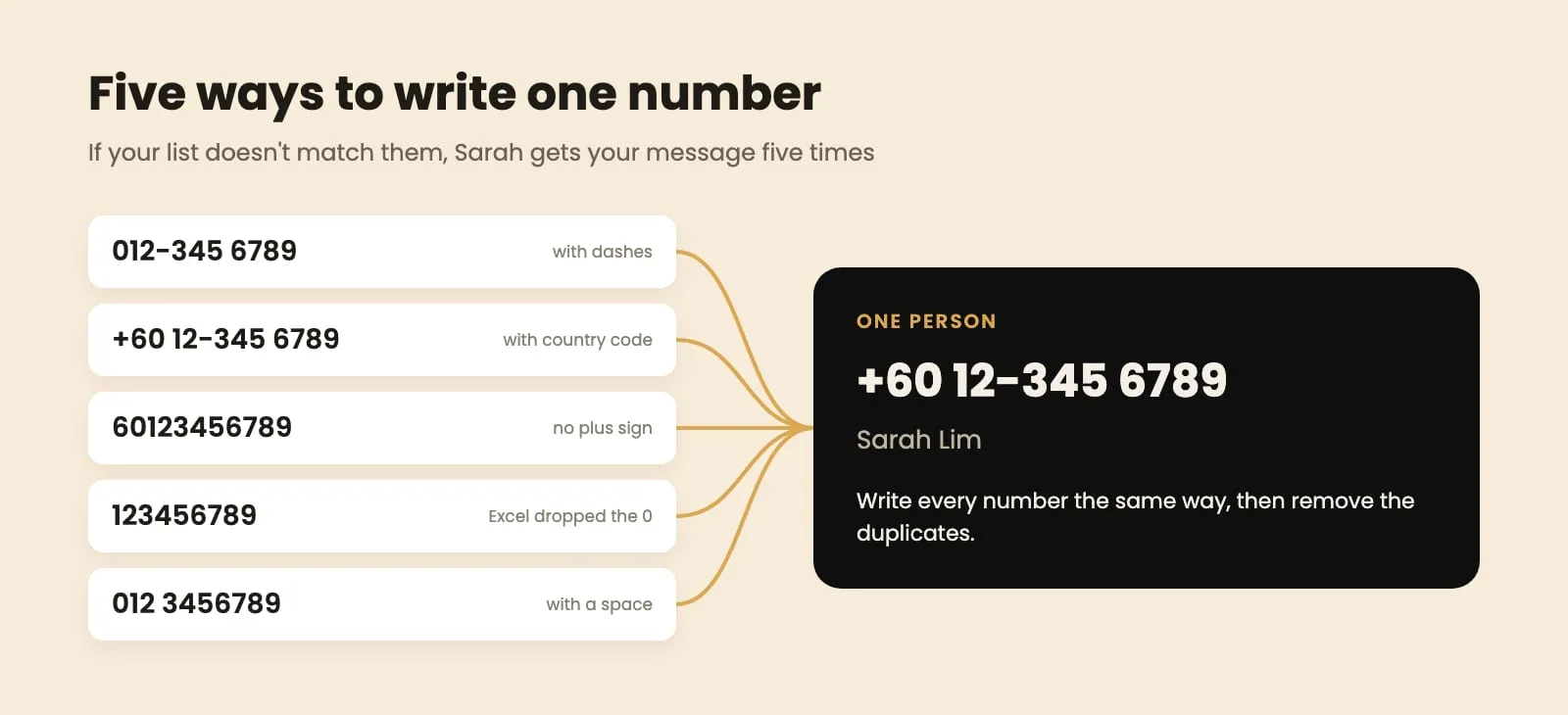
Fix it before anything else. Pick one format for every number. The international format without spaces, like 60123456789, works everywhere. Then:
- Remove spaces, dashes and brackets. In Excel or Google Sheets, use Find and Replace to replace “-” and “ “ with nothing.
- Make every Malaysian mobile start with 60. Numbers starting with 0 get the 0 replaced by 60 (012… becomes 6012…). Numbers that start with 1 lost their 0 in Excel; put 60 in front.
- Keep the column as text. Format the phone column as Text before pasting, or Excel will drop leading zeros and turn long numbers into something like 6.01235E+10.
- Watch for two numbers in one cell. “012-345 6789 / 013-456 7890” needs splitting into two rows.
Take out what doesn’t belong
Once every number looks the same, go through the list in this order:
- Duplicates. In Google Sheets: Data → Data cleanup → Remove duplicates, on the phone column. In Excel: Data → Remove Duplicates. Keep the row with the most information.
- Landlines. Office numbers (03-, 04-, 07- and so on) are almost never on WhatsApp. They only fail.
- Obviously wrong numbers. Too short, too long, all the same digit, or your own team’s numbers.
- People who asked you to stop. Anyone who replied STOP, “don’t contact me”, “jangan” or similar, ever. Keep them on a separate do-not-contact sheet and remove them from every list before every send.
- Competitors and other salespeople, if your list came from a public source. They won’t buy, and they’re the most likely to report you.

Keep one record of who you’ve contacted
Cleaning a list once isn’t enough. The real problem appears on your second, third and tenth broadcast: who did you already message?
Keep one master record with every number you’ve contacted, when, and what happened (no reply, interested, not interested, do not contact). Before every new broadcast:
- Remove everyone you messaged recently with the same offer. “Recently” depends on your business: a few months for insurance renewals, longer for property, shorter for a clinic recall.
- Check across the whole team. If three salespeople each keep their own spreadsheet, the same customer will hear from all three. One shared record fixes it.
- Check your WhatsApp chats too. Someone you chatted with last month may not be in any spreadsheet. If they’re in your chats, they’re already contacted.
This is tedious by hand, which is why most people skip it, and why so many customers get the same message twice.
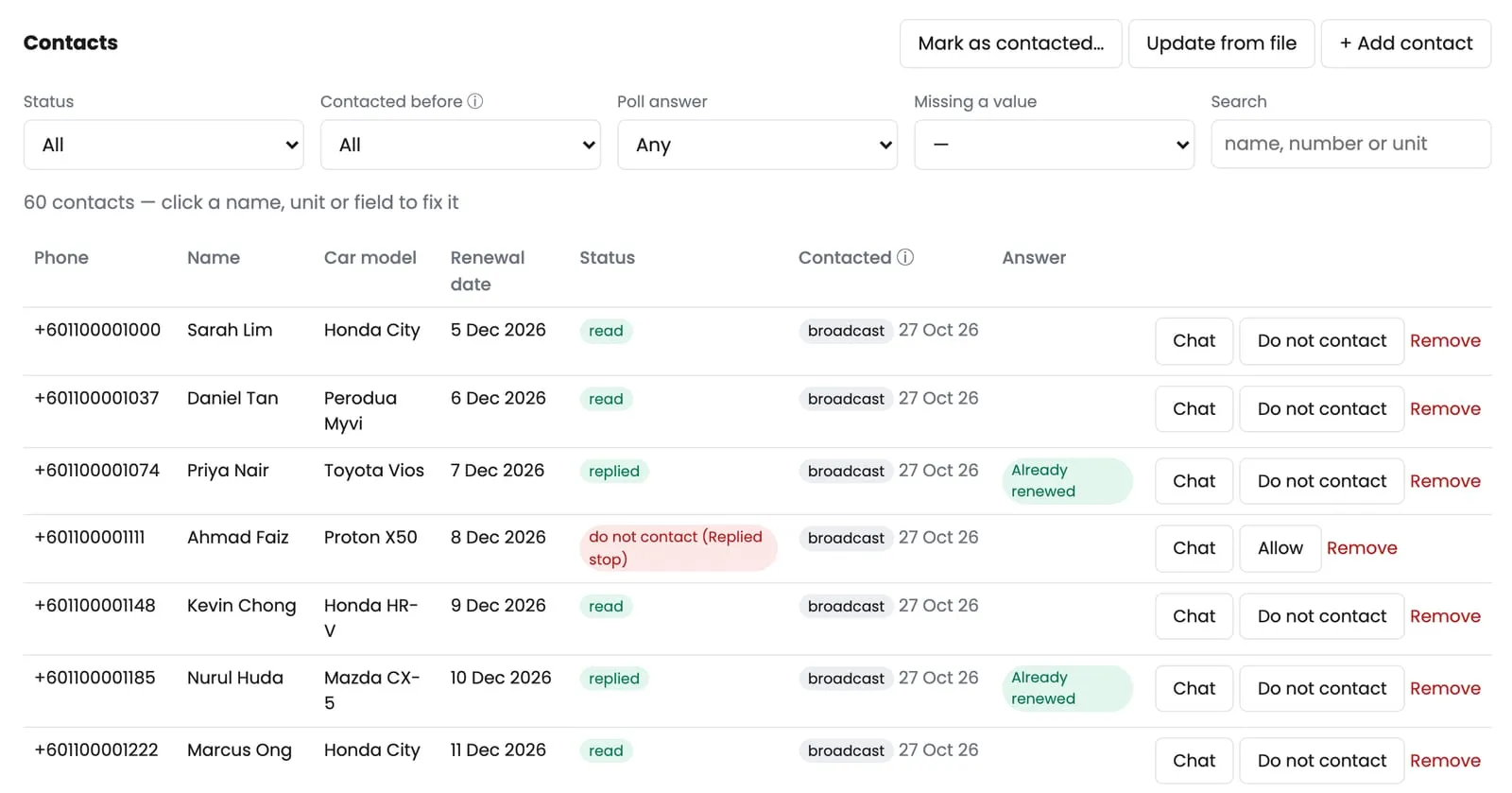
In ZuboChat: when you import a list, numbers in any format (012-, +6012, 6012 or Excel’s missing zero) are matched as the same person, and landlines are flagged. Before each broadcast it skips anyone already contacted, whether by an earlier broadcast, any of your team’s WhatsApp numbers in ZuboChat, or an old record you uploaded. Anyone who replies “stop” goes on do-not-contact for every list, automatically.
Keep your WhatsApp contact list clean as you go
A clean list stays clean only if you update it after every round:
- After each broadcast, mark everyone who got the message as contacted, with the date.
- Every “no” and every “stop” goes to do-not-contact the same day.
- Numbers that turned out not to be on WhatsApp get removed, so they don’t fail again next time.
- Every “not now” gets a follow-up date, so the right person contacts them at the right time.
- New leads are checked against the master record before they’re added, not after.
Ten minutes after each round saves hours of fixing later, and saves you from the customers who’d otherwise hear from you twice.
Using an old list without getting blocked
When you clean an old list, you’ll often find it’s smaller than you thought. That’s fine. A list of 300 people who know you, written correctly and messaged once, will do better than 3,000 numbers from five old spreadsheets.
Old contacts have usually forgotten you, so treat them almost like strangers:
- Sort by how recent they are. Customers and enquiries from the last year first, older ones later, and anything you can’t remember the source of last (or never).
- Start with a small batch. Send to 20 or 30 people and watch what happens over two days: replies, “who is this?”, and silence.
- Remind them where they know you from, in the first line. “Hi Mr Tan, it’s Aisyah from Aria Insurance. We met at the car show in Mid Valley last year.” Without that, an old contact reads you as a stranger.
- Stop if it goes badly. Several “who is this?” replies or a sudden drop in replies means the list is too cold. Don’t push through the rest of it on the same number.
- Update the record as you go. Every answer, good or bad, goes into your master record so the next round starts cleaner.
A clean list is one you trust: every number is real, written once, and belongs to someone who won’t be surprised to hear from you.
For what to send once your list is ready, read our WhatsApp broadcast guide. And if you’d rather the matching, skipping and do-not-contact list were done for you, see ZuboChat’s features or chat with us.