You have a list of 500 customers and one message you want all of them to see. Calling is out of the question. Email will sit unopened. But almost every one of them opens WhatsApp several times a day, which is why a WhatsApp broadcast in Malaysia usually gets more replies than anything else you can send.
The catch: send it the wrong way and people ignore you, block you or report you. Here’s how to do it the right way, from the list you start with to the replies you end up with.
Broadcast or group?
A broadcast sends the same message to many people, but each person receives it in a private chat with you. Nobody sees who else got it, and every reply comes only to you. A group puts everyone in one room: they see each other’s numbers and every reply.
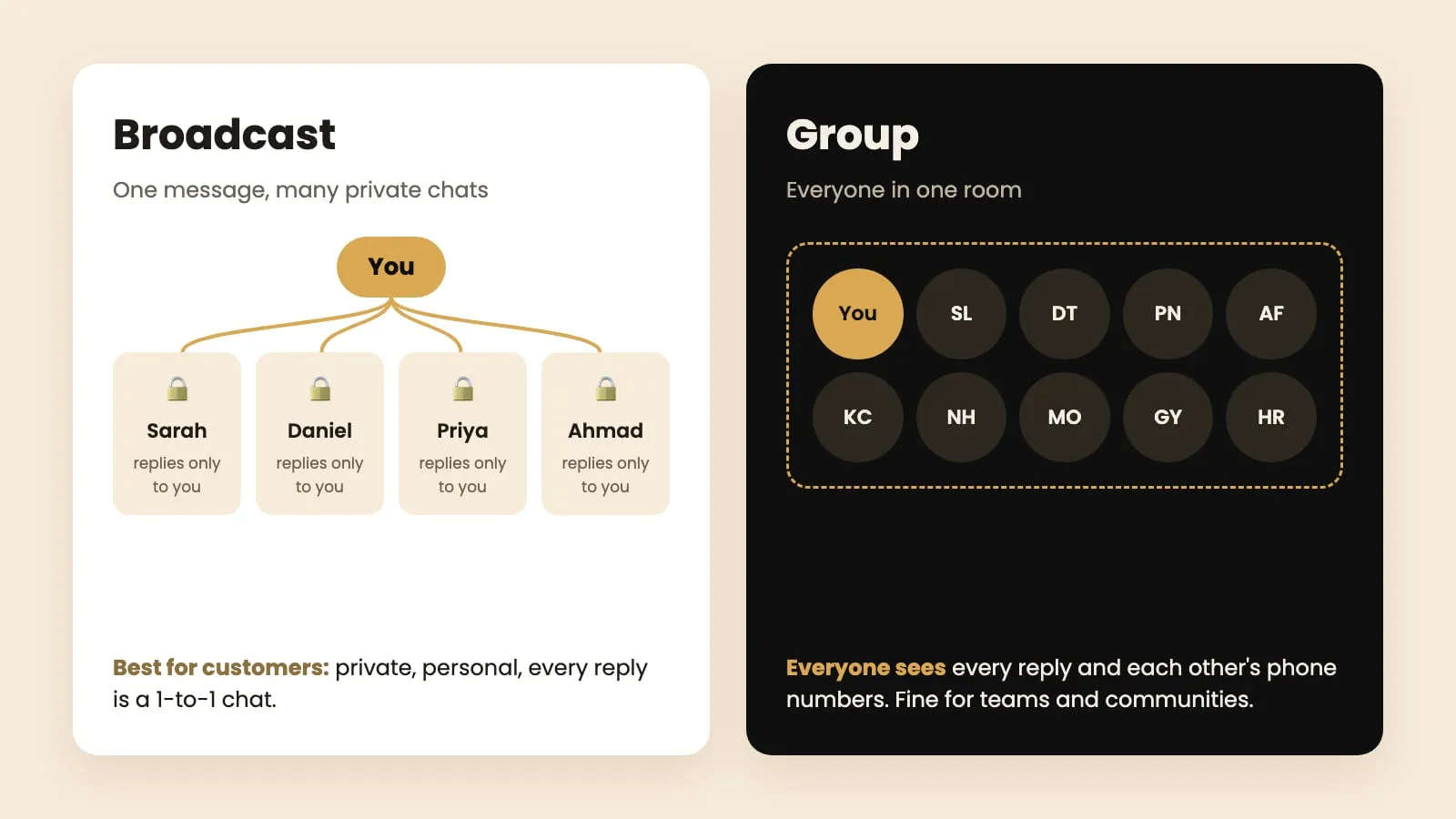
For customers, use a broadcast. People hate being added to groups by businesses, and a private chat feels personal. Every reply becomes a one-to-one conversation you can turn into a sale.
Three ways to send a WhatsApp broadcast in Malaysia
1. WhatsApp’s own broadcast lists. In WhatsApp or WhatsApp Business, create a broadcast list from the menu (on Android: ⋮ → New broadcast), pick contacts and send. It’s free, but each list holds at most 256 people, and the message only reaches people who saved your number in their phone. Everyone else simply doesn’t get it, and WhatsApp doesn’t tell you who missed out. Good for a small circle of regular customers. Useless for a new list of leads, who almost never have your number saved.
2. WhatsApp Business app tools. Labels, quick replies and away messages help you organise chats, but broadcasts there have the same 256-person, saved-number limits.
3. A broadcast tool. Software like ZuboChat sends from your own number to your whole list, one message at a time, whether or not people saved your number. It fills in each person’s name, spaces the messages out, tracks who read and replied, and collects every reply in one inbox your team can share.
If your list is more than a few dozen people, option 3 is the only one that reaches all of them.
Step 1: Get your list into one spreadsheet
You need two columns at minimum: name and mobile number. Extra columns (car model, renewal date, unit type, last purchase) are useful later for personal messages.
- Already in Excel or Google Sheets? Keep it there.
- Contacts on your phone? Open contacts.google.com on a computer → Export → Google CSV.
- Leads in a CRM or another tool? Most have an Export button that gives you a CSV file.
Then clean it: delete landlines (03- office numbers are rarely on WhatsApp), remove duplicates, and take out anyone who has told you to stop contacting them.
Step 2: Take out people you’ve already messaged
Getting the same pitch twice is the fastest way to annoy someone into reporting you. Before every broadcast, remove anyone you messaged in your last round. Doing this by hand means comparing spreadsheets row by row; a tool like ZuboChat does it automatically by checking your WhatsApp chats and past broadcasts.
Step 3: Write a first message that asks one easy question
Your first message has one job: get a reply. Keep it under 50 words, say who you are and why you’re messaging, and end with a question that takes two seconds to answer. Three examples:
Hi Mr Lim, good afternoon! I’m Aisyah, a property consultant in Mont Kiara. Quick one about your unit: is it for rent, for sale, or are you staying there?
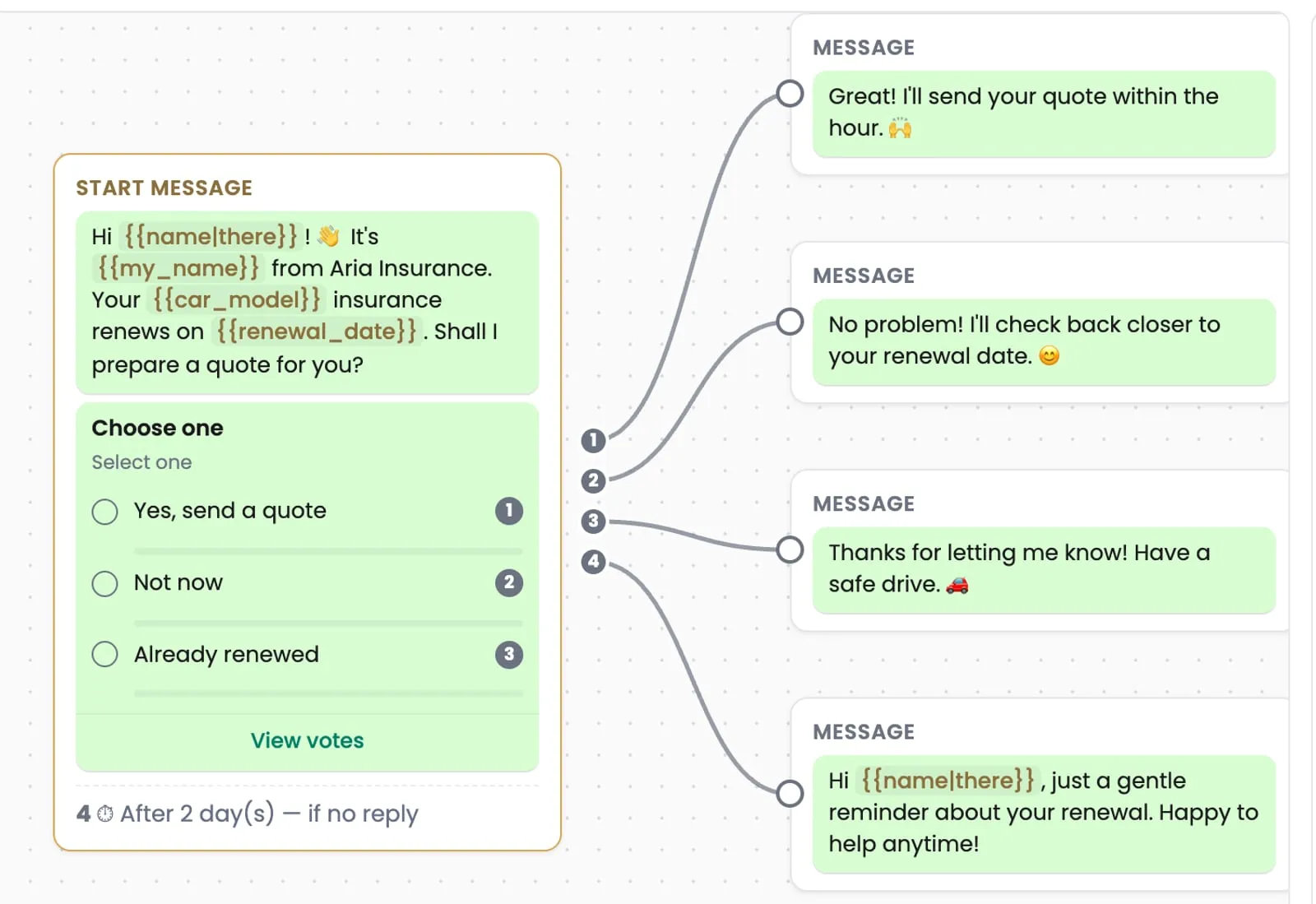
Hi Sarah! It’s Daniel from Aria Insurance. Your car insurance renews next month. Shall I prepare a quote for you?
Hi Priya, Smile Dental here. It’s been six months since your last check-up. Would you like a slot this month?
Notice what’s missing: no brochure, no price list, no five photos. Those go to the people who reply.
Step 4: Turn the question into a poll
A WhatsApp poll lets people answer with one tap instead of typing. In a chat, tap the attach button (📎 on Android, + on iPhone) → Poll. Keep it to two or three options, written the way a customer would say them:
- Yes, send me a quote / Not now / Already renewed
- For rent / For sale / I’m staying there
- Book me in / Remind me next month
Taps are much easier than typing, so more people answer. And each answer tells you exactly where that person stands.
Step 5: Prepare a reply for every answer
Write the follow-up for each poll option before you send anything:
- Yes: the details they asked for, plus one question to keep the conversation going (“Which day suits you for a viewing?”).
- Not now: “No problem, I’ll check back closer to the date.” Then actually do it.
- No / already done: a short thank-you. Nothing else.
In ZuboChat these replies go out automatically within seconds of the tap, even if you’re busy.
Step 6: Send slowly
This is where most people get their number restricted. WhatsApp watches for accounts that suddenly message lots of strangers. Send like a person would:
- New number: 15–20 people a day for the first two weeks, then add about 10 a day each week.
- Gap: a few minutes between messages, never back to back.
- Hours: roughly 10am to 7pm. Nobody wants a sales message at 11pm.
- Opt-out line: add “Reply STOP if you’d rather not hear from me” and remove anyone who does.
In ZuboChat: you set the daily limit and sending hours once. It keeps about three minutes between messages and marks anyone who replies “stop”, “jangan” or “不要” as do-not-contact automatically.
Step 7: Follow up once, then reply fast
Many people answer the second message, not the first. Wait two or three days, then send one short, friendly reminder only to those who didn’t reply: “Hi Sarah, just checking if you’d like that quote. No pressure!” One follow-up is enough; three is pestering.
When someone replies, answer within the hour if you can. A customer who taps “Yes, send me a quote” is ready now. Tomorrow they may have asked someone else.

How to tell if it worked
Look at four numbers for each broadcast:
| Number | What it tells you |
|---|---|
| Delivered | How many numbers are real and on WhatsApp |
| Read (blue ticks) | Whether your timing and name caught their eye |
| Replied | Whether your first message works |
| Interested | How many picked the answer you wanted |
If many people read but few reply, the problem is the message: make it shorter, or make the question easier. Change one thing at a time, send the next round, and compare.
The mistakes that cost the most
- Everything in message one. A wall of text plus photos looks like an ad and gets reported.
- The whole list in one afternoon. Spread it over days, at a steady pace.
- No follow-up. You lose the people who meant to reply but got busy.
- Slow replies. Interest cools within hours.
- Messaging people who said no. Never worth it.
Send a short, friendly question to the right people, at a human pace, and be quick when they answer. If you’d like the sending, the polls, the follow-ups and the shared inbox handled for you, see how ZuboChat works or chat with us. We’ll set it up with you and send your first broadcast together.