Picture the person you’re messaging. They’re on the train, a coffee in one hand, scrolling with their thumb. Your message arrives: six lines about your company, your promotion, your packages, and “let me know if you’re interested”. They mean to reply later. They never do.
Now picture the same person getting two short lines and three buttons underneath. They tap one. It takes a second, and they’ve answered you without having to think of what to say. That’s the whole case for a WhatsApp poll for business: it turns “I’ll reply later” into a reply now.
Why people answer polls
Tapping is easier than typing. A reply to a long message needs the person to decide what to say and type it. A poll needs one tap. Every bit of effort you remove means more people answer.
The options do the thinking for them. “Let me know if you’re interested” leaves people unsure what you want to hear. Three clear options show exactly what a good answer looks like, including a polite “no”.
It feels low commitment. Typing “yes, interested” to a stranger feels like agreeing to a sales call. Tapping “Send me the details” feels like asking for information. Same result for you, much smaller step for them.
“No” is easy too, and that’s good. People who’d ignore a long message will often tap “Not now”. That still tells you something, and it’s far better than silence or a block.

Long message vs. poll
Here’s the same offer written both ways:
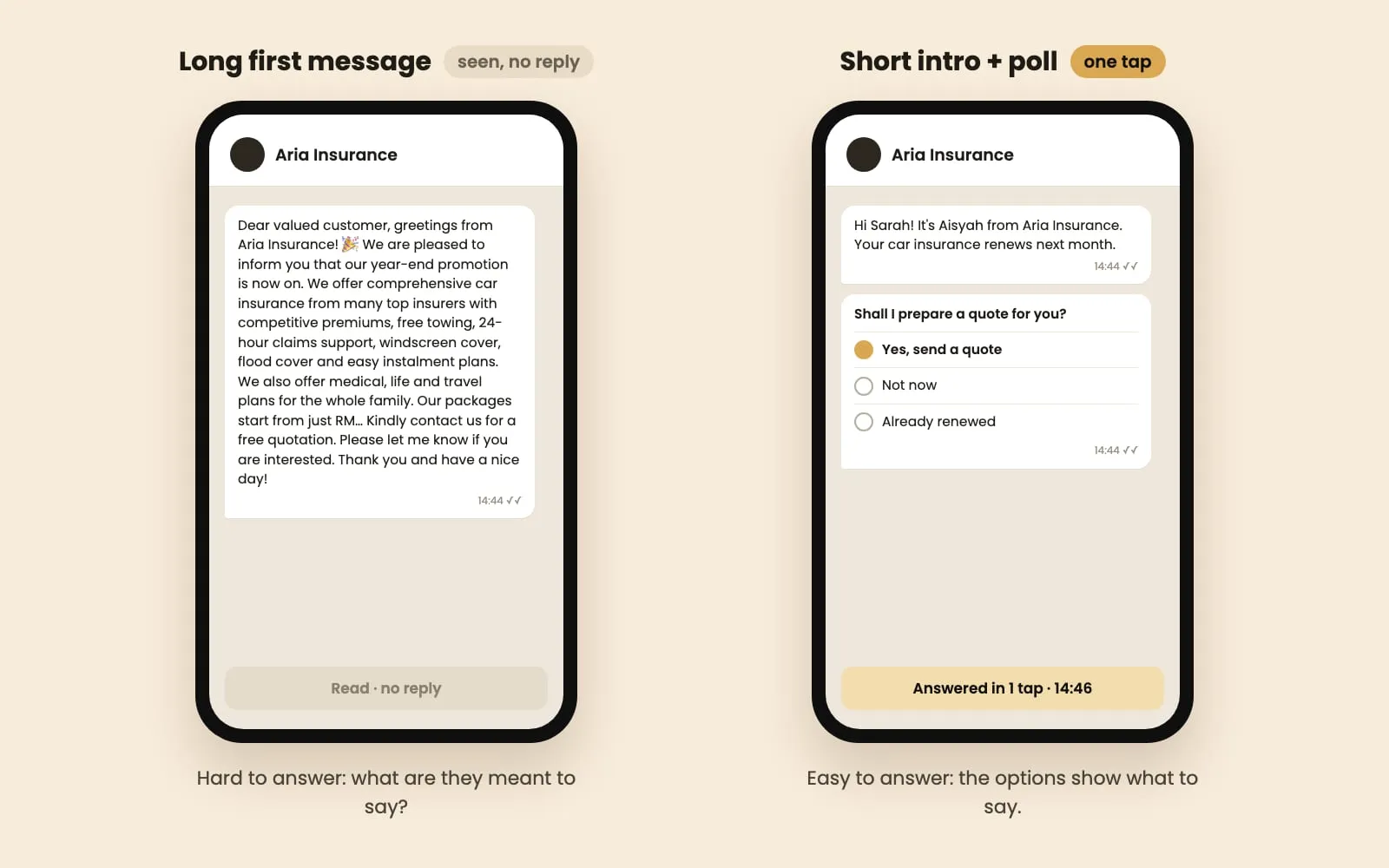
The long version tries to close the sale in one message. The poll version has one job: start a conversation. The details, prices and photos go to the people who tap yes, when they actually want them.
How to write a poll people answer
Start with one or two lines of text before the poll. A poll on its own from an unknown number looks odd. Say who you are and why you’re writing, then send the poll straight after:
Hi Mr Tan, it’s Aisyah from Aria Insurance. Your car insurance renews next month.
Then the poll: “Shall I prepare a quote for you?”
Write the options the way a customer talks. Not “Option A / Option B”, but the words they’d use themselves:
| Business | Poll question | Options |
|---|---|---|
| Car insurance | Shall I prepare a quote for you? | Yes, send a quote · Not now · Already renewed |
| Property | Is your unit available? | For rent · For sale · I’m staying there |
| Clinic | Would you like a check-up slot? | This week · Next month · No, thanks |
| Online shop | Want early access to our sale? | Yes, send me the link · Maybe later |
| Tuition centre | Which class suits your child? | Weekday evening · Weekend · Just browsing |
Keep it to two or three options. WhatsApp allows up to 12, but every extra option makes the choice slower. If you need more than three, the question is probably too complicated for a first message.
Always include a polite way out. “Not now”, “Already renewed” or “No, thanks”. Without one, people who aren’t interested just ignore you, and you can’t tell them apart from people who didn’t see the message.
Turn off “Allow multiple answers”. You want one clear answer per person. Check the switch before you send.
Put the answer you hope for first. People read top to bottom, so the first option is the one they see first and think about most.
To create one: in a chat, tap the attach button (📎 on Android, + on iPhone), choose Poll, type the question and options, then send.
What to send after each answer
The poll only starts the conversation. What you send next decides whether it becomes a sale. Prepare a reply for every option before you send the first message:
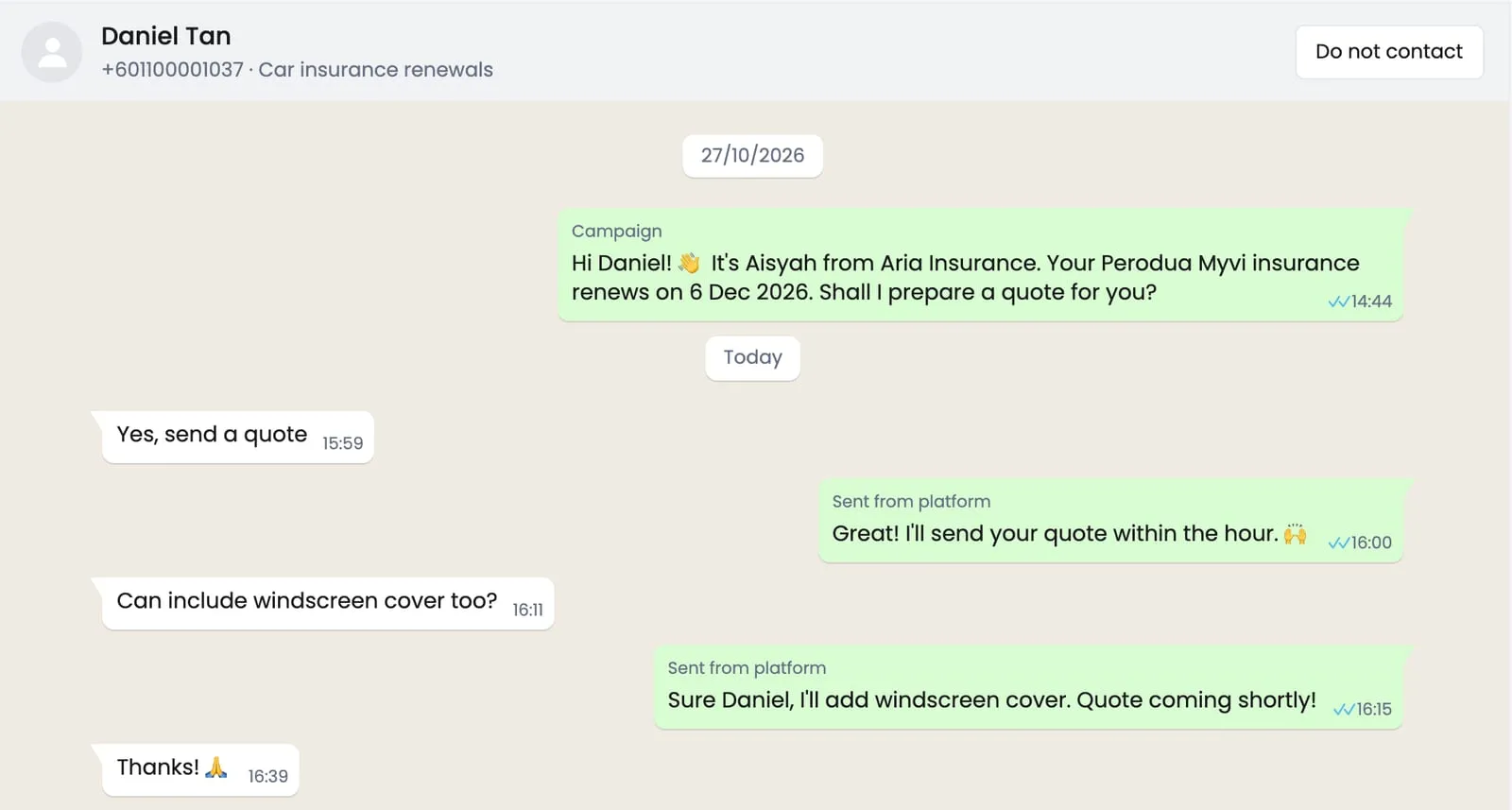
- The “yes” answer: send exactly what they asked for, then one question that moves things forward. “Here’s your quote for the Myvi. Would you like to add windscreen cover?”
- The “not now” answer: “No problem! I’ll check back closer to your renewal date.” Note the date and do it.
- The “no” answer: “Thanks for letting me know. Have a good day!” Nothing more. A polite exit keeps the door open and keeps people from reporting you.
Reply fast. Someone who just tapped “Yes” is thinking about it right now. An answer within minutes feels like great service; an answer tomorrow feels like an afterthought.
In ZuboChat: you build the poll and the reply to each answer once, in a simple flow. When someone taps an option, the matching reply goes out within seconds, even when you’re busy. People who don’t answer can get one friendly reminder after a couple of days, and anyone who taps “Yes” lands in your inbox for you to take over.
Use the answers to sort your list
A poll gives you something a long message never does: a list sorted by how ready each person is.
- Tapped yes: your hot leads. Work these first, today.
- Tapped “not now”: write down when to come back (the renewal month, the end of their tenancy) and contact them then, with a reminder of what they said.
- Tapped no: take them off this campaign. Don’t pitch the same thing again.
- Didn’t answer: one short reminder after two or three days. If there’s still nothing, leave them for a few months.
After a few rounds you’ll know which lists, times and questions bring the most “yes” taps, and you’ll spend your time on people who want to hear from you.
When a poll isn’t the right tool
Polls work best for the first message to a list and for simple either-or questions. They’re the wrong choice when:
- You’re already mid-conversation. If a customer is chatting with you, just reply like a person.
- The answer needs detail. “What’s your budget and which areas do you like?” needs typing. Ask it after they’ve shown interest.
- The news is serious. A price increase, a problem with an order or a complaint deserves a proper written message, not buttons.
Quick answers about WhatsApp polls for business
Can people see who voted? Yes. In a chat or group, you can tap View votes to see who picked each option, and so can everyone in a group. Tell people that if the question is sensitive.
Can a poll be anonymous? Not in a normal chat or group. Polls in WhatsApp Channels are anonymous, but a channel is one-way, so it doesn’t work for one-to-one follow-up.
Can I edit a poll after sending it? No. Delete it for everyone and send a corrected one. That’s another reason to check the wording and the options before you tap send.
Can people change their answer? Yes, they can untick and pick again. You’ll see their latest choice.
How many options can a poll have? Up to 12, but two or three work best for a first message.
Can people pick more than one option? Only if “Allow multiple answers” is on. Turn it off when you want one clear answer.
Test it on your own list
Don’t take our word for it. Next time you send to a list, split it in half. Send half your usual long message and the other half a short intro plus a poll. After three days, compare how many people replied in each group, and how many of those replies were real interest. Keep whichever wins, then test one change at a time: the question, the wording of an option, the time of day.
A poll won’t save a message sent to the wrong people or at the wrong time, so the basics in our WhatsApp broadcast guide still apply. But for getting a stranger to answer you at all, few things work as well as a short line and a one-tap question. If you’d like polls, replies and reminders handled for you, see how ZuboChat’s flows work or chat with us.