You open WhatsApp in the morning and see a banner: your WhatsApp account is restricted, and you can’t start new chats until a countdown runs out. Yesterday you sent a few dozen messages to new leads. Today you can’t message anyone new.
It happens to a lot of salespeople, and it’s almost always avoidable. A restricted WhatsApp account isn’t random bad luck. It’s WhatsApp reacting to a pattern it reads as spam. Change the pattern and you rarely see the banner.
What “restricted” actually means
There are two levels, and it helps to know which one you’re looking at.
- Restricted. You can’t start new conversations for a period of time, shown in the app. You can still reply in chats that already exist, so your current customers can still reach you. When the timer ends, the number works normally again. How long it lasts varies: the app shows the exact time, and people report anything from a few hours to 24 hours for a first restriction, and several days when it happens again.
- Banned. The app says the account is not allowed to use WhatsApp. The number stops working completely until WhatsApp reviews it, and the review can go either way.
A restriction is the warning. Ignore it, carry on the same way, and the next step is usually a ban.

What WhatsApp is watching
WhatsApp doesn’t read your messages to decide this. It looks at behaviour, and these are the signals that matter:
- People blocking or reporting you. This is the big one. When a number they haven’t saved messages them, WhatsApp shows the person a Block and a Report button right above your message. Every tap counts against you.
- Many messages to people who don’t have you saved. Normal people mostly chat with their contacts.
- Sudden jumps. A number that sent five messages a day last week and 200 today looks like it has been taken over or sold.
- Machine-like timing. The same message, sent every 10 seconds, all day.
- Few replies. If almost nobody answers you, it suggests nobody wanted to hear from you.
Everything below comes down to one idea: look like a busy, polite person, not a machine.
Set up your number before you send anything
People decide in two seconds whether your message is a scam. In Malaysia, where everyone has heard of phone scams, a blank profile is enough to get you reported. Before your first broadcast:
- Use the WhatsApp Business app and fill in the business profile: business name, category, a short description, hours and a website or Instagram link.
- Add a clear profile photo: your face, or your company logo.
- If the number is brand new, use it normally for a week or two first. Chat with colleagues, join your team group, reply to a few customers. A number with a normal history is trusted more than one that wakes up and starts broadcasting.
Start slow and build up
This is where most restrictions come from: sending too much, too early. Here’s a pace that works for most numbers:
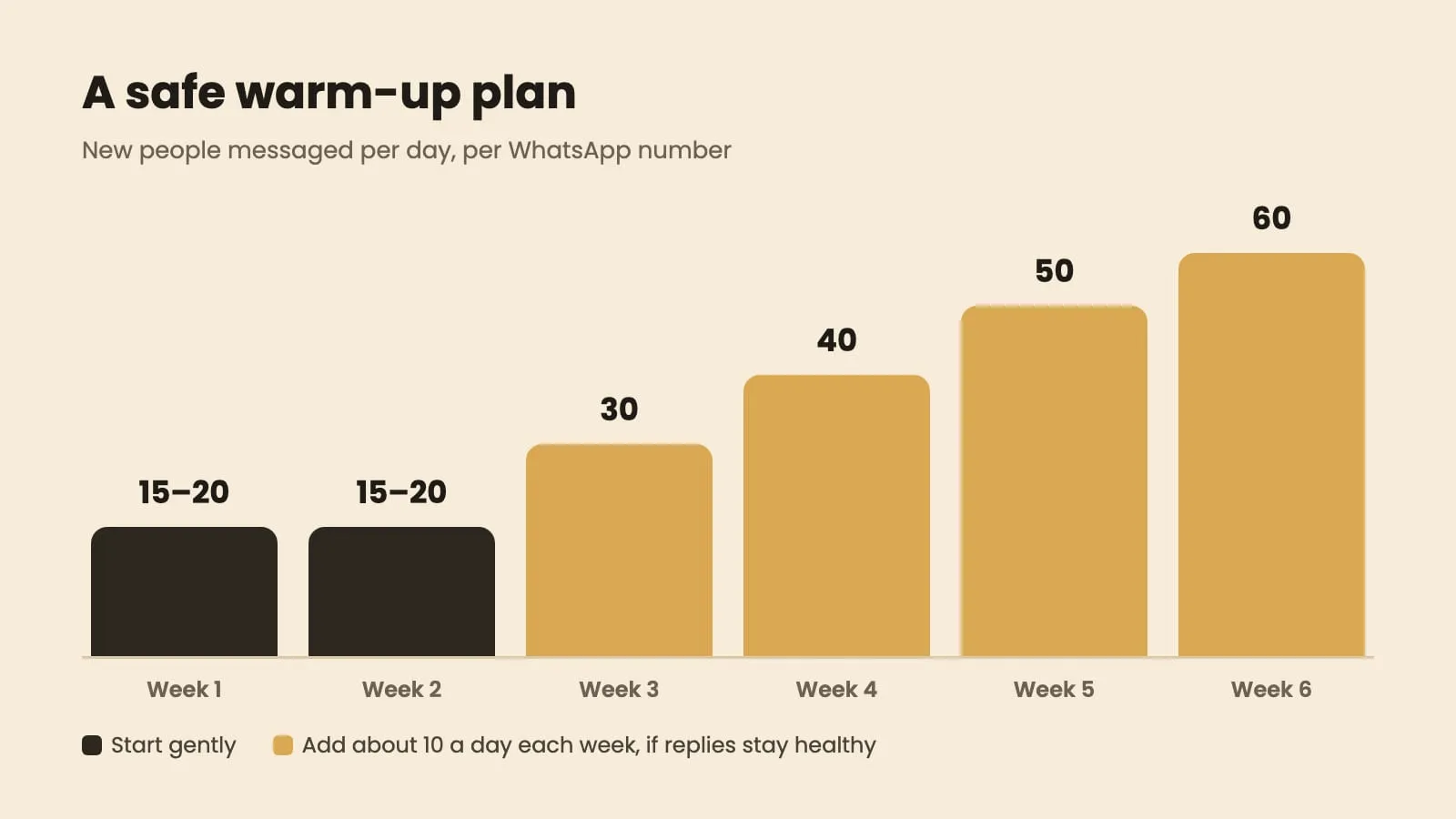
- Weeks 1–2: 15–20 new people a day.
- After that: add about 10 a day each week, as long as replies stay healthy.
- Gap: a few minutes between messages, and not exactly the same gap each time.
- Hours: roughly 10am to 7pm, Monday to Saturday. Messages at night get reported far more.
If you need to reach more people than one number can safely handle, use two or three numbers and split the list between them, each at its own safe pace. Don’t push one number harder.
Write a first message nobody wants to report
The first message decides whether the person taps Reply or Report. A few rules that make a big difference:
- Say who you are and why you’re writing, in the first line. “Hi Mr Tan, it’s Aisyah from Aria Insurance. Your car insurance is due next month.” A stranger with a reason is fine; a stranger with no reason is spam.
- Use their name, and vary a few words between messages so not every copy is identical.
- No links and no attachments in the first message. Links from unknown numbers look like scams. Send the brochure after they reply.
- End with an easy question, or a poll they can answer with one tap. Replies are the strongest sign that your messages are wanted.
- Give a way out: “Reply STOP if you’d rather not hear from me.” It’s far better they type STOP than tap Report.
Our WhatsApp broadcast guide has full examples of first messages and polls that get answered.
Keep your list clean
Your list matters as much as your message. A bad list means more blocks, no matter how polite you are.
- Never message the same person twice with the same pitch. Remove everyone from your last round before you send the next one.
- Remove anyone who said no, STOP or “who is this?” for good. Never add them back by accident from another spreadsheet.
- Delete landlines and obviously wrong numbers. Lots of failed deliveries looks bad too.
- Old lists are risky. A list of leads from three years ago will have many people who’ve forgotten you. Start with your warmest contacts.
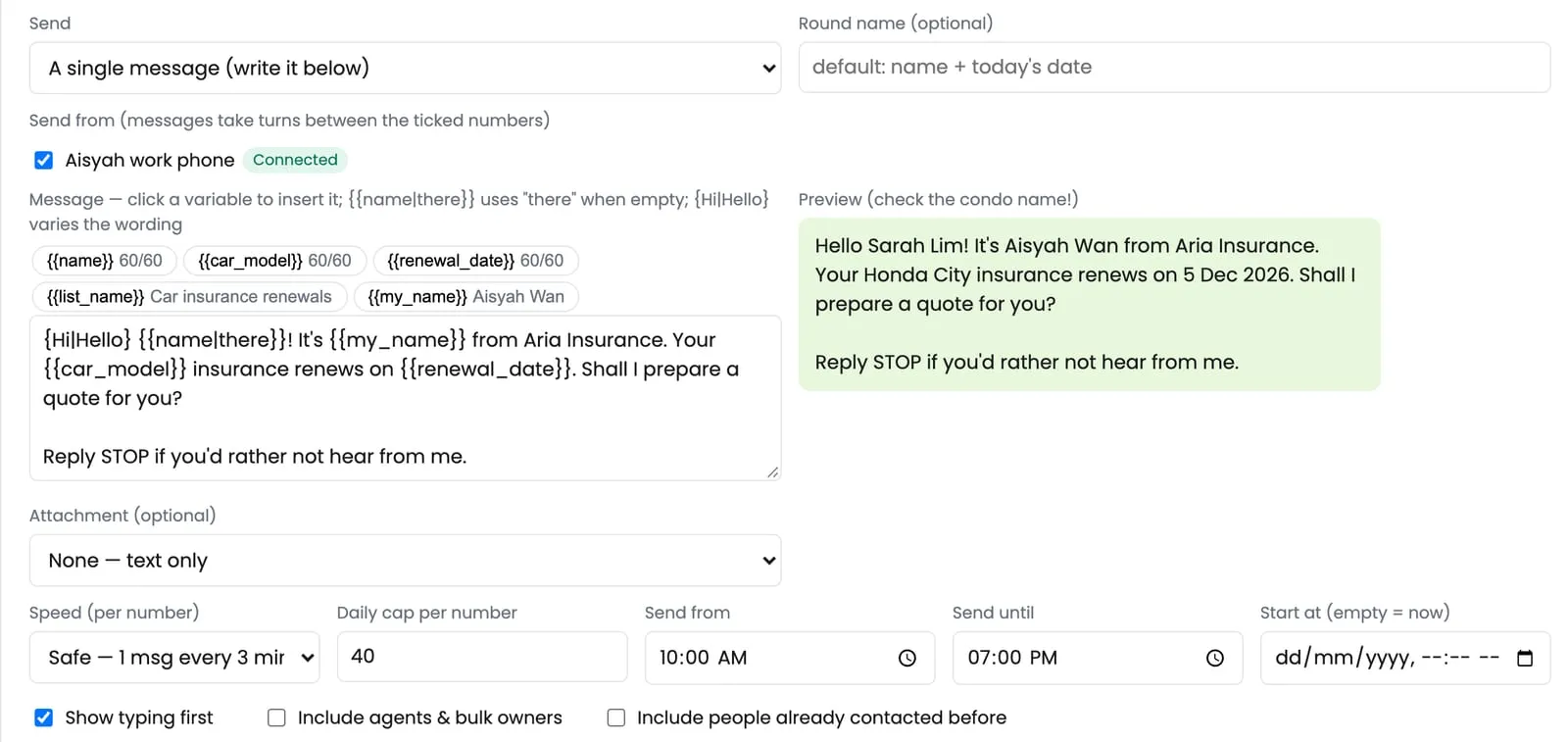
In ZuboChat: you choose the speed (one message every 1, 3 or 5 minutes, with natural variation), the sending hours and a daily limit for each number, and it can take turns sending from several numbers. It skips anyone you’ve already messaged and marks people who reply “stop”, “jangan” or “不要” as do-not-contact automatically.
How to fix a restricted WhatsApp account
- Stop all new messages from that number right away. Pause any broadcast that uses it. Sending more is how a restriction turns into a ban.
- Keep answering existing chats as normal. You still can, and real conversations are good for the number.
- Don’t reinstall WhatsApp or move the number to another phone to get around it. It doesn’t reset anything and can make it worse.
- Wait for the timer to finish. Then restart at about half your previous daily number, and build up again slowly.
- Look at what caused it. Usually it’s one of three things: a big jump in volume, an old or cold list, or a first message with a link. Fix that before the next round.
If the number is banned rather than restricted, use the Request a review option in the app. Explain briefly that it’s a business number used to contact your own customers. Then wait. Some bans are lifted, some aren’t, which is why it’s worth being careful from the start.
Most numbers that get restricted were sending too much, too fast, to people who didn’t expect it. Slow down, make every first message easy to answer, and keep your list clean, and your number will last. If you’d like the pace, sending hours and clean lists handled for you, see ZuboChat’s features or chat with us.